 PeckList
Obsidian plugin
PeckList for Obsidian
Write a task in your notes, tag it #pecklist, and it shows up in PeckList.
Tick it off on your phone and the line in your note follows.
The plugin syncs task lines written in the Tasks plugin's format with your PeckList server, both ways: titles, dates, priority, tags, repeats and done. It works on Obsidian for desktop and mobile.
You need: Obsidian 1.13 or later, the community Tasks plugin, and an account on a PeckList server running 0.10 or later (your own or one someone runs for you).

In Obsidian's plugin directory · Source on GitLab · Changelog · Report a problem
Install
- In Obsidian, open Settings, then Community plugins, and turn them on if asked.
- Select Browse, search for Tasks, install it and enable it.
- Search for PeckList, install it and enable it.
To install by hand instead, download main.js, manifest.json and
styles.css from the
latest release
into <your vault>/.obsidian/plugins/pecklist/, then enable PeckList in
Community plugins.
Set it up
- Open the plugin's settings and enter your server's address, for example
https://tasks.example.com. -
Select Sign in with browser. Your browser opens your server's sign-in
page: sign in as you usually do and type the code the plugin shows. The plugin never
sees your password. Or paste an API key made in PeckList (API keys, in your account
settings) with the
tasks:readandtasks:writepermissions. - Pick a Default list for lines tagged
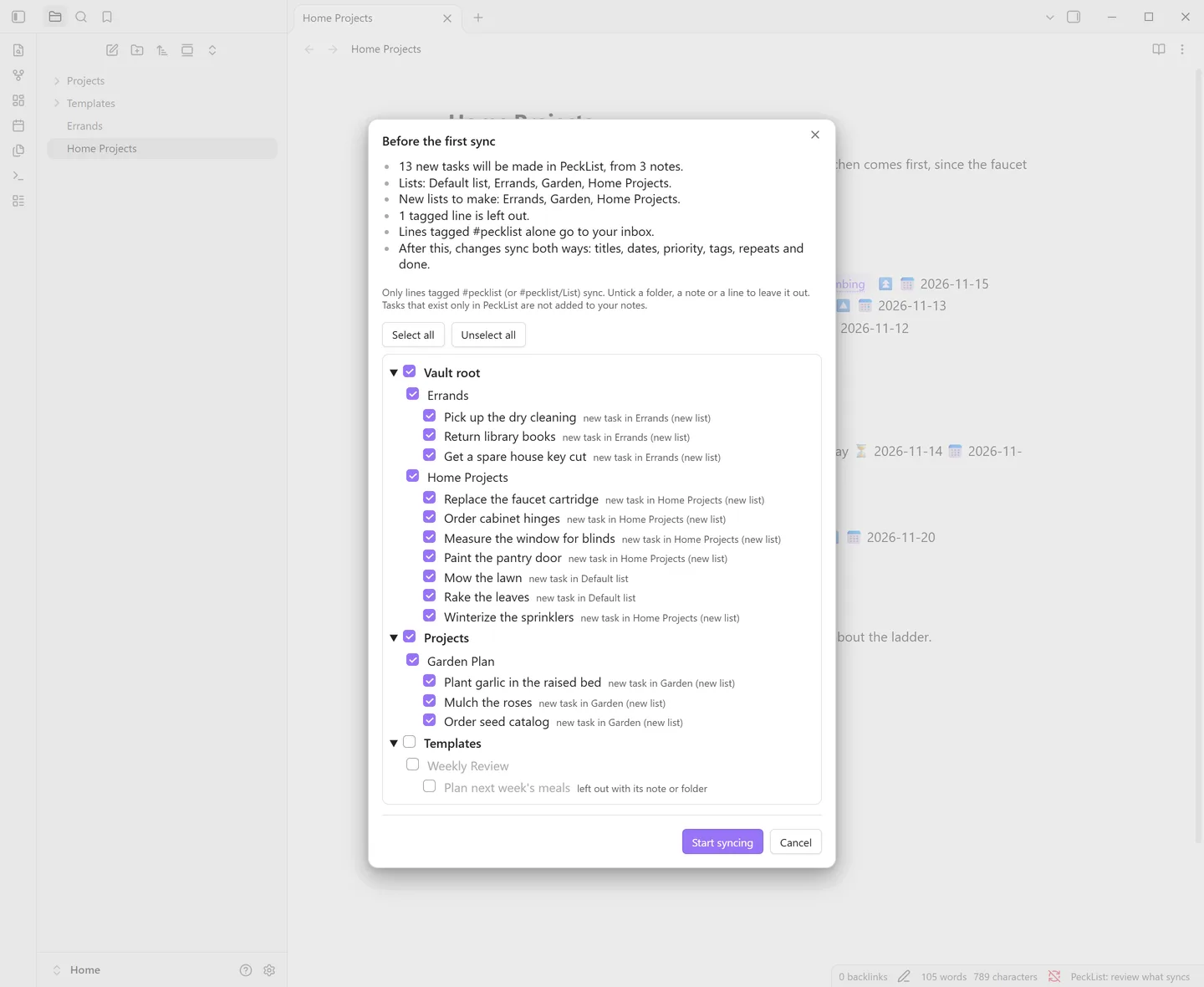
#pecklistalone, or leave it on your inbox. - Before the first sync, a review lists every tagged line by folder and note, with a summary of what will happen. Untick folders, notes or single lines to leave them out, then select Start syncing. Each device reviews once.
Which lines sync
- Only task lines with a PeckList tag:
#pecklistgoes to the default list,#pecklist/Workto the list Work. -
List names are matched ignoring case, and
-or_stand for spaces, so#pecklist/Home-Projectsgoes to Home Projects. A list that doesn't exist yet is made. - Lines that are already done when the plugin first sees them are not sent.
-
Folders and notes can be left out in the settings or in the review.
Templatesis left out from the start, and the plugin never writes into a left-out folder. - A single line left out in the review gets
%%[pecklist:: off]%%; delete that mark to bring it back.
Once a line is linked, the plugin adds a hidden id to it, such as
%%[pecklist:: 01JC8R5K2Z4N6PX0M3WQ7HB9TA]%%. It's an Obsidian comment, so
reading view doesn't show it, and it sits before the dates so the Tasks plugin still
reads them. Leave it there: it's how a later edit updates the same task instead of
making a new one.
What syncs
| In the note (Tasks format) | In PeckList |
|---|---|
| The line's text | Title |
#pecklist, #pecklist/List | The list |
Other tags (#yard, #home/garden) | Tags (new ones are made) |
| ⏫ or 🔺 / 🔼 / 🔽 or ⏬ | High / medium / low priority |
| 📅 due date | Due date |
| ⏳ scheduled date | Date (start) |
| 🔁 every ... | Repeat |
[x] with ✅ date, [-] with ❌ date | Done, won't do |
-
Not synced: 🛫 start and ➕ created stay in the note. So do the tags in
Tags not sent, which starts with the Tasks plugin's global filter
(such as
#task). - Times: Tasks dates have no time of day. A time set in PeckList stays on the server when the date moves in the note.
- Repeats are translated both ways when they are every day, week, month or year, every N of those, every weekday, given weekdays, a day of the month, the nth or last weekday of the month, or "when done". Other forms stay as written on each side.
- Ticking a repeating line: the Tasks plugin writes the next line itself; the plugin completes the task once in PeckList and gives the new line the server's dates.
In the editor
The bird
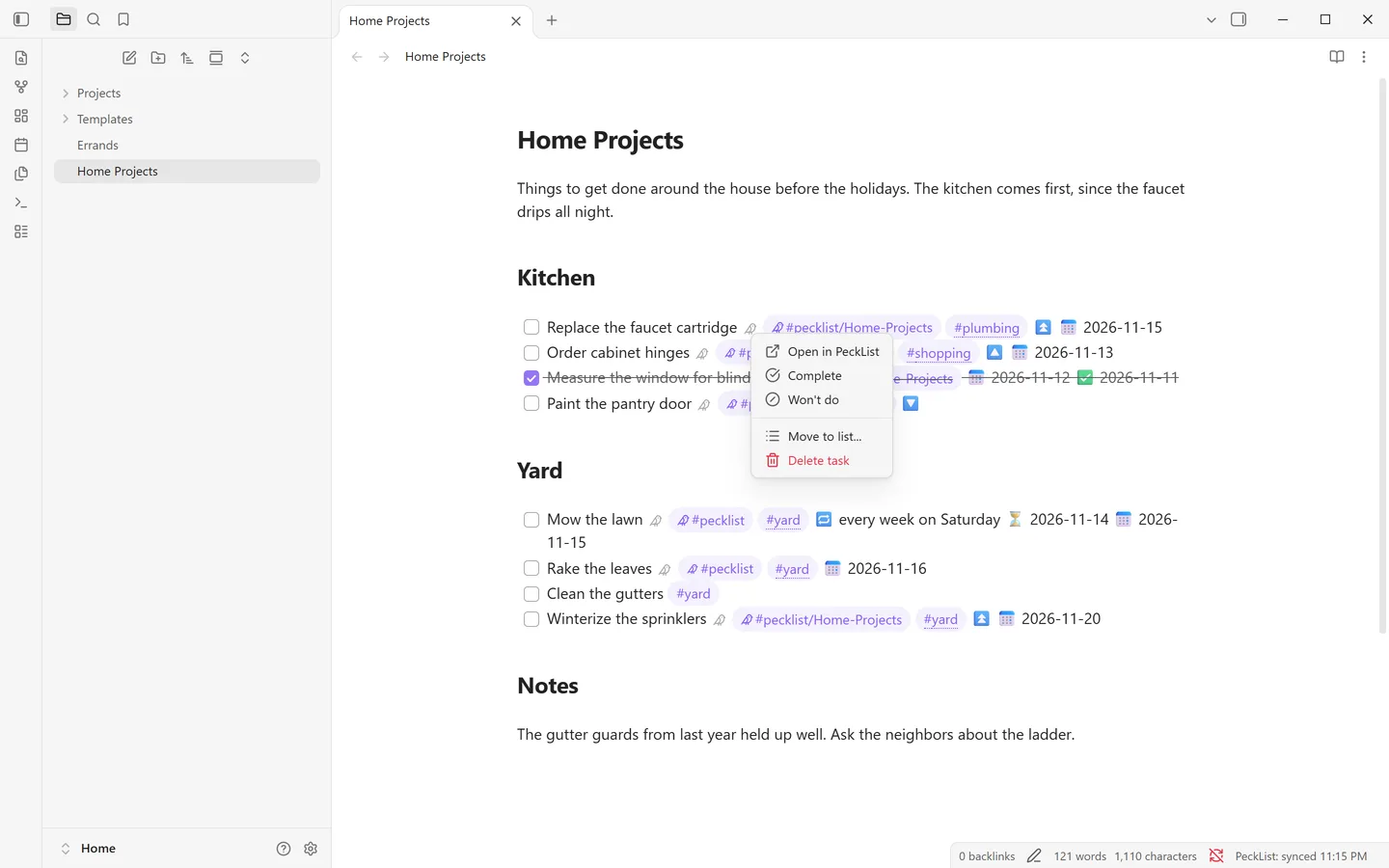
In Live Preview the hidden id shows as a small bird. Select it to open the task in PeckList. Right-click it for the task menu:
- Open in PeckList
- Complete and Won't do, or Reopen on a closed task
- Move to list...
- Delete task: removes the line and moves the task to PeckList's trash, where it can be restored
Each one edits the line, so undo in the note brings it back, and the change syncs right away. A repeating task is completed through the Tasks plugin, the same as ticking its box.
Suggestions
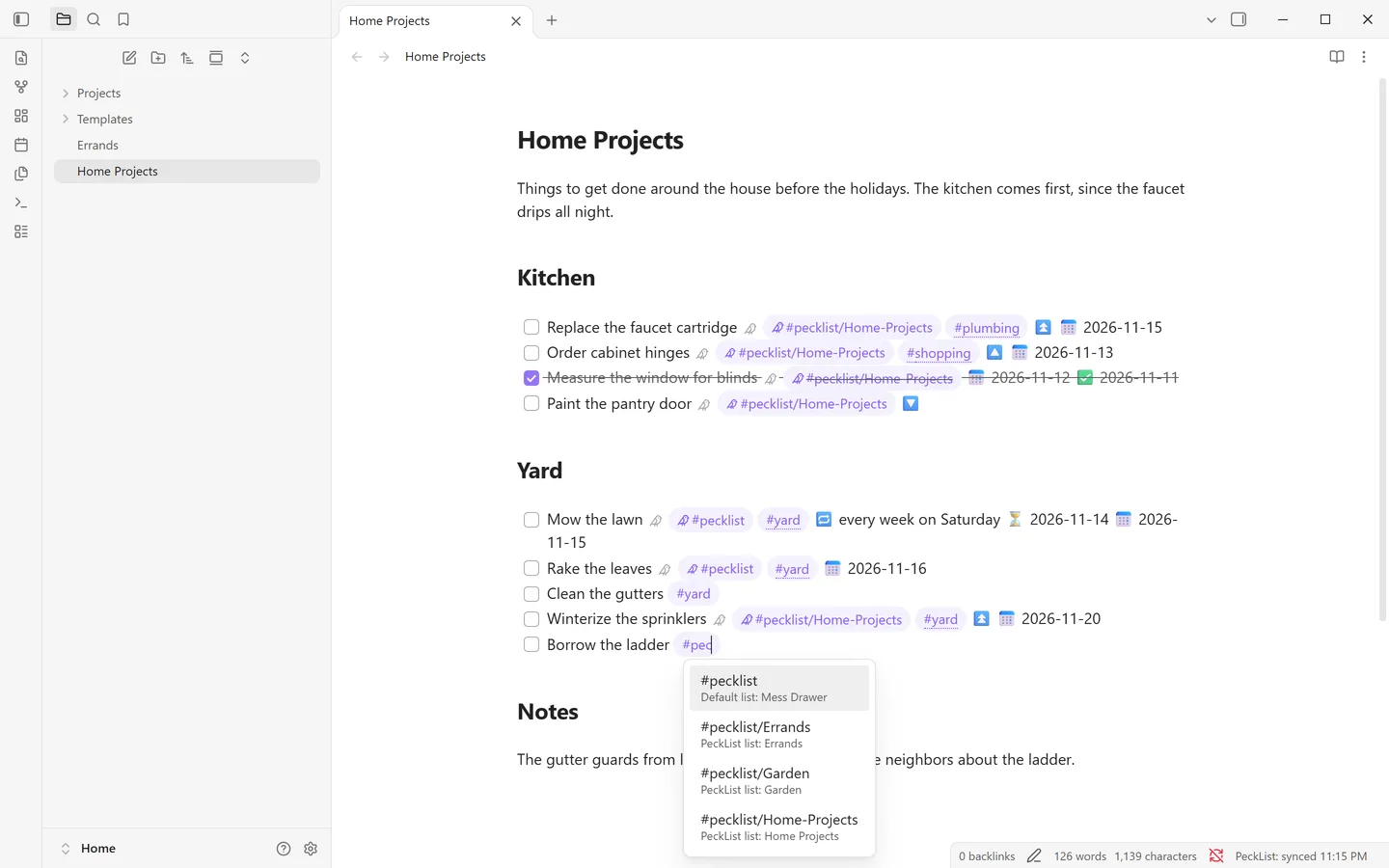
Typing #pec on a task line suggests your PeckList lists. On a line that
syncs, typing another tag suggests tags from your vault and from PeckList together,
each marked with where it comes from. Everywhere else, Obsidian's own tag suggestions
show as usual.
#pec suggests your PeckList lists.Tag marks
On lines that sync, list tags get a small bird and the tags sent to PeckList get a dotted underline, in Live Preview and in reading view. They are drawn in your theme's own tag color, so any theme keeps its look. Turn them off with Mark PeckList tags.
How both ways works
- Edits: only the fields that changed are sent, so a title edit in Obsidian and a date change on your phone both survive. If the same field changed on both sides, the newer change wins.
- Deleted in Obsidian: deleting a linked line, or taking its PeckList tag off, moves the task to PeckList's trash. If many linked lines disappear at once, the plugin asks first.
- Deleted in PeckList: when a task is deleted in PeckList, or its list stops being shared with you, the line stays in your note as plain text, without the tag and id.
- Made in PeckList: tasks made in PeckList itself are not added to your notes.
- When it syncs: at startup, a few seconds after a tagged line changes, on a timer (every 5 minutes unless you change it), and with the Sync now command. Changes made offline wait for the next sync.
- Several devices: a vault shared through Obsidian Sync, Syncthing or the like works. Each device keeps its own sync state and signs in on its own, and the API key stays in Obsidian's secret storage on the device, not in the vault.
Settings
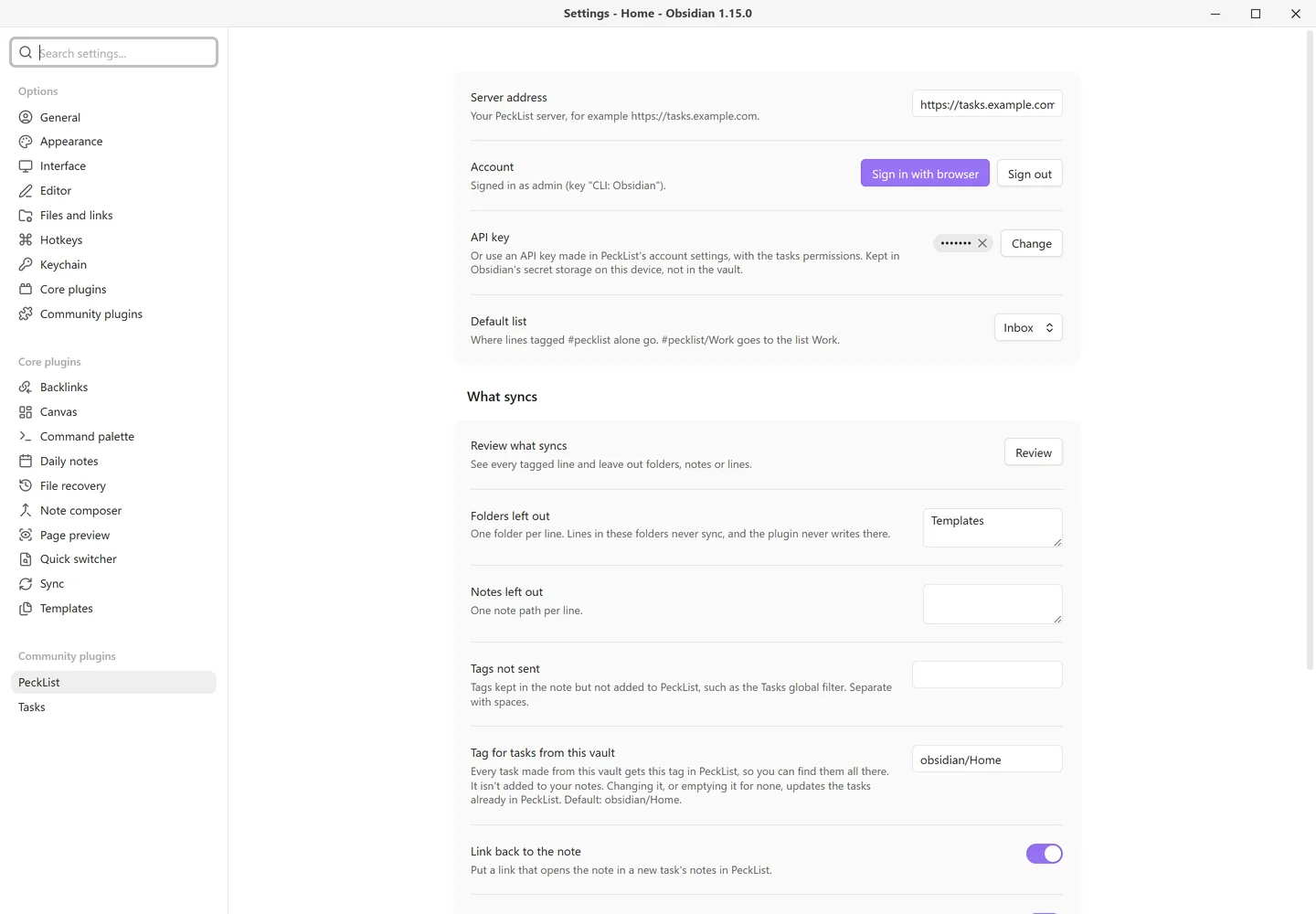
- Server address and Account: where to sync, with Sign in with browser and Sign out. Signing out after a browser sign-in revokes that key on the server; a pasted key is revoked in PeckList's settings.
- API key: instead of signing in, a key made in PeckList, kept in secret storage on this device.
- Default list: where lines tagged
#pecklistalone go. - Review what syncs: the same review as before the first sync, any time.
- Folders left out and Notes left out: one per line.
- Tags not sent: tags kept in the note but not added to PeckList.
-
Tag for tasks from this vault: every task made from the vault gets
this tag in PeckList (
obsidian/<vault name>unless you change it), so you can find them all there. It's never written into your notes. Changing it, or emptying it for none, updates the tasks already in PeckList. - Link back to the note: a new task's notes in PeckList get a link that opens the note.
- Mark PeckList tags: the bird and underline on tags described above.
- Sync on a timer: how often to sync, or never (it still syncs after edits and on Sync now).
- Start over on this device: forgets what this device last synced; links in notes stay, and the next sync asks you to review again.
Commands: Sync now, Review what syncs and Sign in with browser.
What it sends, and where
The plugin talks to one server: the PeckList server whose address you enter. Nothing is sent anywhere else, and there is no telemetry.
- It sends the task lines you tag (title, dates, priority, tags, repeat, done) and the list each goes to, and reads those tasks back.
-
With Link back to the note on, a new task's notes get an
obsidian://link holding your vault's name and the note's path. - Untagged lines, the rest of your notes, and folders and notes you leave out are never read for sending.
Questions
A task I made in PeckList isn't in my notes.
That's by design: only lines you write in Obsidian are linked. Tasks made in PeckList stay there.
I see a second copy of a task.
A line copied with its hidden id is a second link to the same task, so the plugin gives the copy a new task of its own. Delete the copy, or keep it as its own task.
The status bar says "not synced".
Select Sync now to see why. The usual reasons are a server that can't be reached, or a sign-in that no longer works: sign in again from the settings.
The first sync says my account has no inbox yet.
A brand new PeckList account gets its inbox the first time PeckList is opened. Open PeckList in your browser once and sync again, or choose a Default list in the plugin settings.
How do I stop syncing a vault?
Disable the plugin, or leave out the folders. The tasks stay in PeckList, and the hidden ids stay in your notes so syncing can pick up again later.